Hello and welcome back to Press Play: Your SME Video Advantage!
I’m thrilled you’re here for Episode 5, because today we’re diving into one of my absolute favorite topics. I like to call it The Pocket Production Studio: how to transform the smartphone you already carry everywhere into a legitimate video creation machine.
You know the myth, right? That glossy, high-end video is reserved for people with big budgets and fancy cameras. I’m here to tell you—with a massive smile on my face—that the most powerful content creation tool you own is probably sitting in your pocket right now. And it’s been there the whole time.
Let’s unlock its potential together.
The Camera App You Already Own (Yes, That One)
Before we talk gear or technique, let’s start where the magic actually happens: your phone’s native camera app.
Most people hit record without ever touching the settings. That’s like buying a sports car and never taking it out of first gear.
Here’s my practical checklist:
Resolution: For almost all social media and website content, 1080p is pure gold. It looks crisp, files are manageable, and it uploads quickly. I save 4K for “hero shots”—those key moments I might want to zoom or crop later without losing quality.
Frame Rates: Think of these as different artistic brushes. 24fps gives you that beautiful cinematic, film-like feel. 30fps is your reliable all-rounder. And 60fps? That’s your secret weapon for buttery-smooth slow motion that makes even simple movements look premium.
My unbreakable rule: Always lock focus and exposure. Simply tap and hold on your subject until you see “AE/AF LOCK” appear. This stops the camera from doing that annoying “breathing” thing—constantly hunting for focus and adjusting brightness like an indecisive dinner guest. One tap and your shot instantly looks more professional.
Lighting: The Great Equalizer
If there’s one truth I’ll repeat until I’m blue in the face, it’s this: I would rather shoot with an older phone in beautiful light than the newest iPhone in terrible light.
Lighting is everything.
Your most powerful lighting tool costs exactly zero dollars: a big window. Face it. That soft, directional natural light is incredibly flattering and instantly makes you look like you hired a crew.
When you’re ready to level up (or you’re filming at night), create a simple three-point lighting setup. You don’t need Hollywood gear. A couple of affordable LED panels or even strategic household lamps can eliminate harsh shadows and give your face beautiful dimension.
The difference is shocking. Good lighting is the difference between looking like a random person talking to their phone and looking like a trusted industry expert.
Audio: The Make-or-Break Factor
Here’s a fundamental truth in this business that I wish someone had told me years ago:
Audiences will forgive slightly shaky video. They will not forgive bad audio.
Your phone’s built-in microphone has improved, but for clarity that builds trust, an external microphone is worth its weight in gold.
For interviews, a simple wired lavalier mic (the one that clips to your lapel) is pure magic. For more directional sound, a mini shotgun mic can be excellent.
And here’s my favorite free trick: Location, location, location. Record in a room with soft surfaces—rugs, curtains, couches. These materials soak up echo like a sponge. A quiet, treated space costs nothing and makes your audio sound three times more expensive.
Goodbyes to Shaky Cam (The #1 Amateur Tell)
Nothing pulls viewers out of your message faster than shaky, amateur footage.
The fix is simpler than you think.
Start with a basic flexible mini-tripod. They’re inexpensive and incredibly versatile—you can wrap them around railings, tree branches, or just set them on a table. In a total pinch, I’ve leaned my phone against a stack of books or a sturdy coffee mug. For static shots, it works like a charm.
When you’re ready for movement, a smartphone gimbal turns your walking shots into smooth, cinematic glides. The first time you use one, you’ll feel like a kid who just discovered their bicycle has training wheels removed. Pure freedom.
Your Essential $100 SME Video Kit
Let’s make this ridiculously practical.
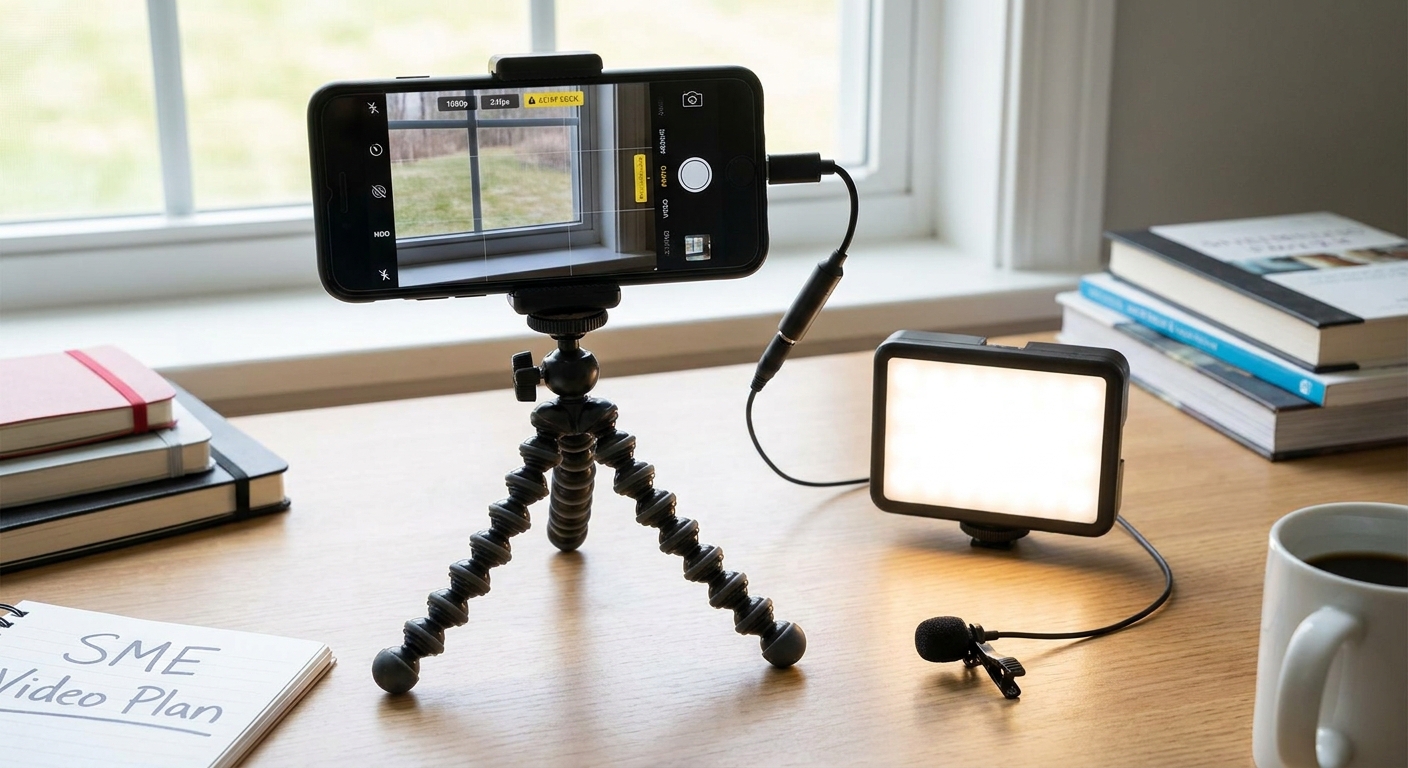
After years of testing, I’ve distilled everything down to what I call the Essential SME Smartphone Video Kit. You only need three items:
- A flexible mini-tripod
- A simple lavalier microphone
- A small portable LED light
The entire setup? Usually under $100 if you choose wisely.
That tiny investment delivers an absurd ROI. It’s the bridge between “homemade” and “professional” that most people never cross because they think they need thousands of dollars of equipment first.
When You’re Ready for More Control
Once you’ve mastered the native camera app and gotten a taste for great video, you’ll likely want more creative control. That’s when dedicated apps like FiLMiC Pro or Protake become your new best friends.
These apps give you manual controls—focus, ISO, shutter speed, white balance—that would normally require a high-end camera. This is the moment you stop taking video and start making video.
The Mindset Shift That Changes Everything: Shoot for the Edit
Here’s the pro move that instantly makes your videos feel more polished: Shoot for the edit.
Instead of filming one long, continuous take (the rookie mistake), think like an editor while you’re shooting. Capture a variety of shots—wide, medium, and close-up—for every important moment. Then gather B-roll: footage of your product, hands typing, relevant details, establishing shots.
B-roll is like the secret sauce. It keeps viewers engaged, covers your edits, and tells a richer story. The first time you edit with plenty of B-roll, you’ll feel like you’ve been let in on a professional secret.
Editing Magic—Right in Your Pocket
The beautiful part? You don’t need to learn complicated desktop software.
Apps like CapCut and Adobe Rush are genuinely impressive. Import your clips, trim, arrange, add captions (essential for silent scrolling), drop in royalty-free music, and export. The entire journey from shoot to finished video can happen on the same device you filmed with.
It still blows my mind how powerful this is.
You Already Have Everything You Need
Here’s what I hope you take away from today’s episode:
Creating professional-looking video has far less to do with the price tag on your camera and everything to do with mastering fundamentals—beautiful light, clean audio, and a steady shot. Nail those three things and you’re genuinely 90% of the way there.
You have everything you need right now. It’s in your pocket.
My challenge to you: Don’t overthink it. Just create one piece of video this week using what we’ve talked about. Press play. Start.
As your business grows, your video needs will grow too. And sometimes doing it all yourself stops being the best use of your time. That’s exactly what we’re tackling in the next episode: Hiring Smart: Finding and Vetting Your First Video Freelancer.
I can’t wait to see you there.
Until then, keep creating, keep improving, and remember—your pocket studio is ready whenever you are.
What’s one thing you’re going to try with your smartphone this week? Drop it in the comments—I read every single one and would love to cheer you on.
See you in the next episode!
— Your mentor in making video feel easy,
The Press Play Team